
OddPen
See why a post worked. Then write your own.
OddPen follows the creators in your niche and breaks down why a post landed. Then it writes a script from it, in your own voice.
Tour of the app
Recorded in the app with a made-up persona, Weeknight Kitchen, following 15 public cooking channels. The breakdown, angles and script are what the app wrote, unedited. Waiting time is cut, and the recording has no sound.
What makes it different
No AI markup
The provider bills you directly. We add nothing on top.
From a post in your niche to your script
Add the sources you already read. New posts land in your feed.
- YouTube channels, podcasts, Substack and any RSS feed. Paste a link and OddPen finds the name and feed.
- Add many at once. One link per line.
- Apple Podcasts links work. OddPen finds the real feed behind them.
- Checks every 2 to 12 hours while the app is open. You pick how often.
Open a post. OddPen gets the transcript, then explains why it landed.
- Transcript first. Public captions when they exist. If not, speech-to-text runs on your computer.
- Structure. Core argument, opening hook, emotional arc, pacing and pauses, highlights.
- Why it spreads. Quotable lines, why audiences love it, and the content gap.
- Adaptation. How well it would work for you, with notes on how to adapt it.
Three fresh takes on the topic. You choose one.
- Each angle comes with a hook line, its main points, and why it fits you.
- Steer it. Type what you want blended in before you generate.
- Not right? Regenerate for three more.
A full script from your angle, in your voice. Then fix it sentence by sentence.
- Follows your Persona. Banned words, off-limits topics, catchphrases and your reference scripts.
- Follows the source's length. A short video gives a short script.
- Creative assistant. Ask it to shorten, fix grammar or punch up the hook. Each changed sentence has a checkbox, and you keep only what you tick.
- Edit in place, copy, or download as a text file.
Start from an idea
One line in, a first draft for a short vertical video out.
Repurpose your writing
Paste your own article and turn it into a script.
One-off links
Analyze a single video, article or podcast without following the source.
Saved as Markdown
Every saved item is written as a .md file to a folder you choose.
History
Search everything you've opened. Filter by date, platform or status.
Transcription speed
Fast to Accurate. An NVIDIA card is used when you have one.
Your computer, plus the AI you pick
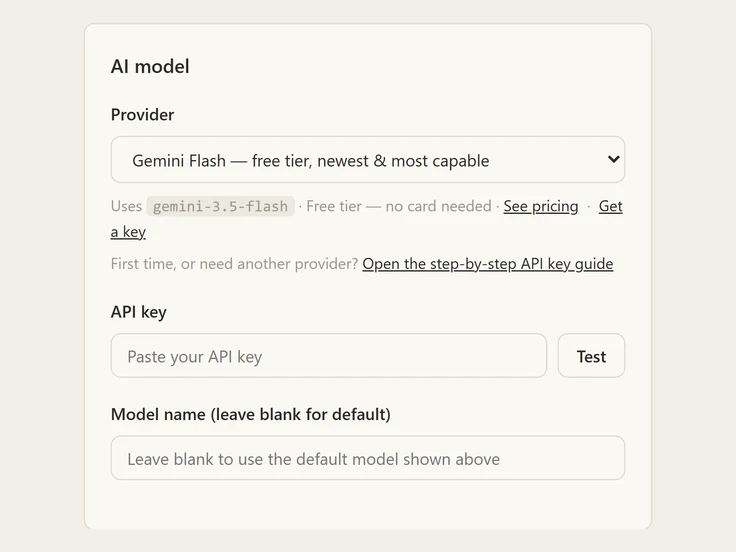
No graphics card needed. Writing uses your own key, so you choose the provider and the cost.
This computer
Speech-to-text, your sources, transcripts, scripts, saved files and API keys.
Stays localYour AI provider
Breakdowns, angles, scripts and the assistant. Only the text you analyze or write is sent, and only to the provider you chose.
Your keyInternet
Needed to fetch your sources, activate your license, check for updates and reach your AI provider.
RequiredWhat the AI costs. A breakdown, three angles and a script make about three AI calls. Google, Alibaba and Groq have free tiers with daily limits, enough to try OddPen and run a light feed. Past that, a paid key costs money per call. In our test with a paid Google key, that came to about 10 cents per video. Prices change, so check your provider's pricing page. Getting a key takes about a minute, and OddPen has a step-by-step guide built in.
Models and licenses
| Free tier, your key | Google Gemini Flash and Flash-Lite, Alibaba Qwen Flash, gpt-oss-120b on Groq | Each runs on its provider's servers under that provider's terms. gpt-oss-120b is an Apache 2.0 model. |
| Paid, your key | DeepSeek V4 Flash, OpenAI GPT-5 mini, Anthropic Claude Haiku 4.5 | Billed by the provider at its own rates. |
| Speech-to-text, on your computer | OpenAI Whisper (tiny, base or small) through faster-whisper | MIT license. About 150 MB, downloaded the first time you need it. |
These are the defaults. You can type any model name in Settings, and the defaults are updated when a provider retires a model. Provider pricing: Gemini · Groq · DeepSeek · OpenAI · Anthropic.
OddPen
One-time purchase
Buy OddPen Pay with cryptoTry it free for 24 hours, no card needed. Refund policy
Included
- Every feature. No usage caps from us.
- 12 months of updates. After that, updates are $49 a year if you want them. The app keeps working either way.
- Use it on 2 computers.
- Optional: Setup help (coming soon), a remote install and a month of support, +$99.
Requirements
- Windows 10 or 11
- No graphics card needed. About 8 GB of RAM recommended.
- An internet connection
- Your own AI key. A free tier works.
Questions
Is this a subscription?
No. You pay once and get 12 months of updates. The AI is billed by your own provider, and we add nothing on top.
Is it really free to run the AI?
For light use, it can be. Google, Alibaba and Groq have free tiers, with daily and per-minute limits that can run out. Past them, a paid key cost us about 10 cents per video in our own test.
What can I follow?
YouTube channels, podcasts, Substack newsletters and other RSS feeds. You can also analyze a single video, article or podcast link without following the source.
What if a video has no captions?
OddPen downloads the audio and transcribes it on your computer. The speech model, about 150 MB, downloads the first time.
Does it spend my key on its own?
No. While the app is open it only fetches new posts in the background. Transcripts and breakdowns start when you open an item. Close the app and the schedule pauses.
Are there limits I should know about?
It explains why a post worked. It can't promise yours will go viral. Spotify-only and paywalled podcasts can't be read. There is no Mac version yet.
Does my data leave my computer?
Your sources, transcripts, scripts and API keys stay on your computer. What leaves: requests to fetch your sources, license activation, update checks, and the text you send for analysis or writing, which goes only to the AI provider you chose.
More guides on the blog.