
Video Studio
Her picture, her voice: she talks.
Give it one picture and a voice line, and she speaks it, lip-synced. Four more modes make the other shots.
Tour of the app
Your materialsImage Studio pictures · Vox voices · video links · character LoRAVideo Studio5 modes on your card · 3 more onlineFinished clipschecked · kept in Records · sent back to Odd Hub
Recorded in the app. Nothing new was generated for it: the clips in Records were made earlier. Waiting time is cut.
What makes it different
Five ways to make a shot
Her picture and a voice line go in. She says the line, lip-synced, with sound.
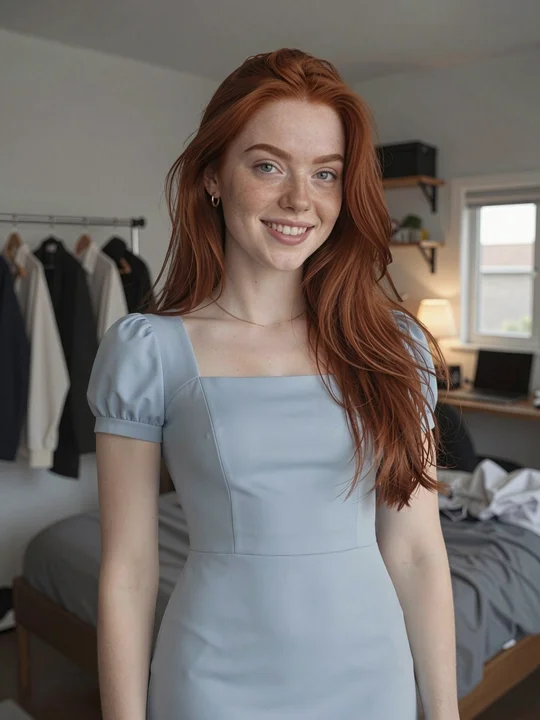
“This is the dress. Powder blue, a square neckline, and soft puff sleeves. It’s fitted through the waist, so the shape stays clean all day.” Her voice is from Vox Studio. Made with the same model that runs on your card, on a rented GPU. Turn the sound on to hear her.
- In: a picture of her, and a voice recording from Vox Studio or anywhere else.
- Out: a talking clip with sound. Up to 10 seconds per shot on your card.
- Longer: online talking models run up to 10 minutes per clip.
- How she moves while talking is written for you from the picture.
A dance or any movement goes in. She does the same moves.
She copies the dance step for step, in a concrete loft.
- In: a reference video, or a pasted YouTube, Instagram or TikTok link, plus her picture.
- Out: her, copying the movement. On your card it uses her character LoRA.
- Write it for me writes the camera and motion line from the reference video.
A still and one line of motion go in. A 2 to 10 second clip comes out.
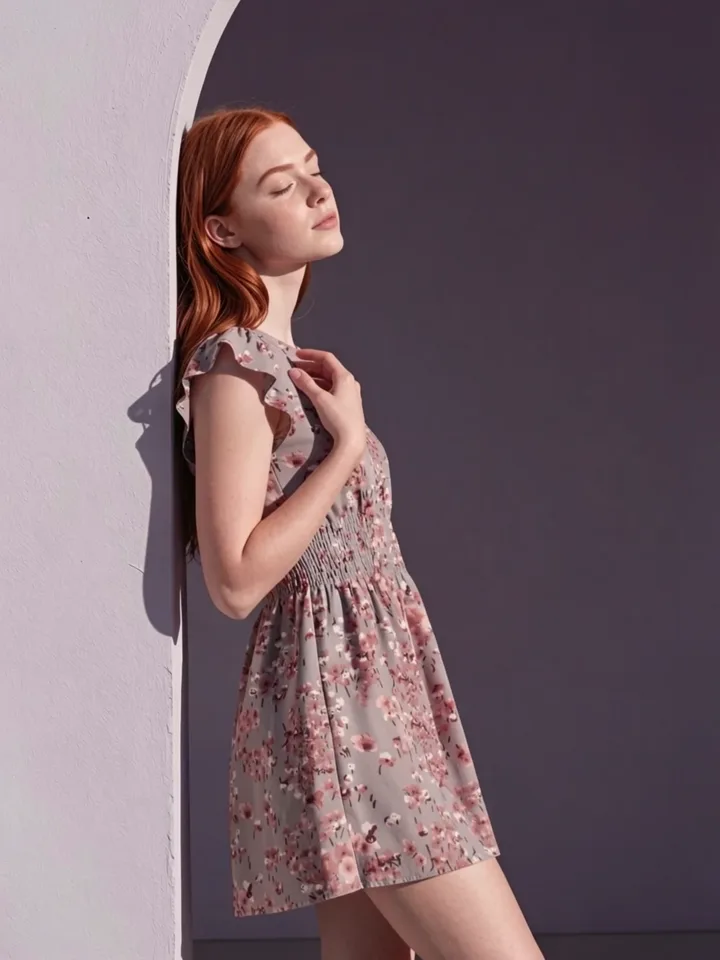
“Slowly the hand at her chest lowers a little and her weight shifts. A soft band of warm sunlight drifts across the wall and over the dress.” Made on an online model.
- In: a start picture, or up to 3 pictures of the same subject.
- Out: 2 to 10 seconds, with sound. Online models go up to 30 seconds.
- No picture yet? Make one right here. It lands in Materials, ready to use.
Words go in. A 2 to 10 second clip comes out.
“Medium shot on a street in Rome. Two friends walk toward each other, give each other a high five, then hug and pat each other on the back. The camera stays still.”
No picture used. Made at 720p with the same model that runs on your card, on a rented GPU.
- In: only a prompt. No picture needed.
- Out: 2 to 10 seconds on your card, with sound. Online models go up to 30 seconds.
- Improve it turns a rough idea into a full prompt.
A first and a last frame go in. The movement between them comes out.
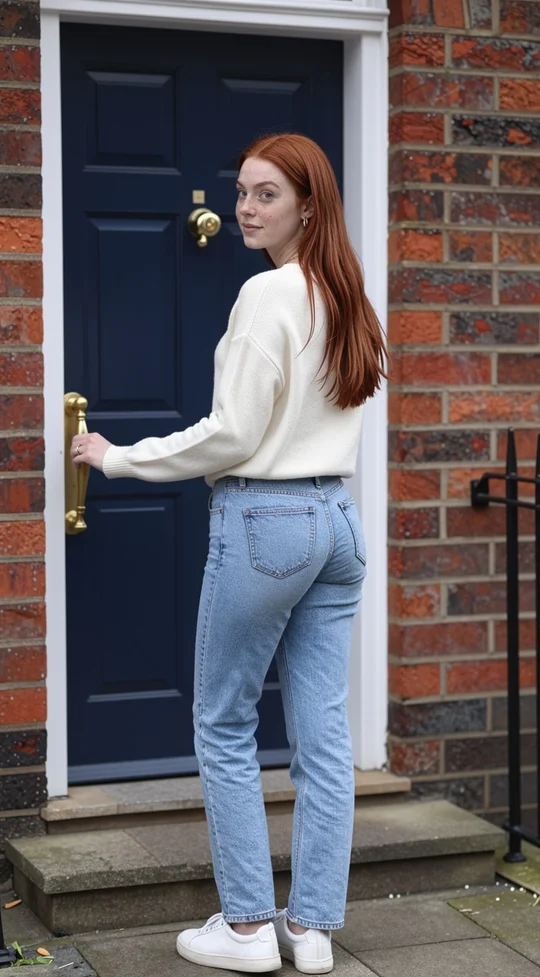
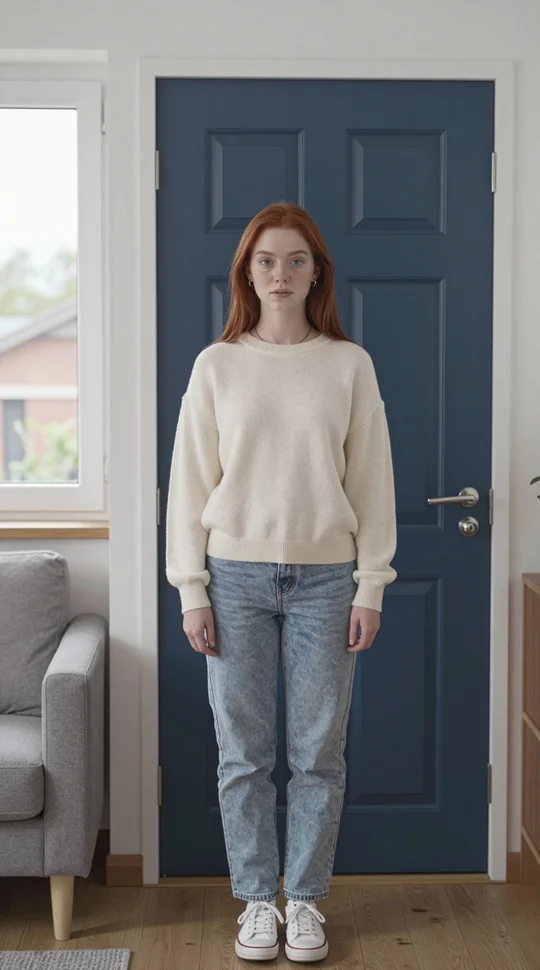
She pushes the door open, walks in and turns around inside, in one move with no cut. Made with the same models that run on your card, on a rented GPU.
- In: two pictures: where the shot starts and where it ends.
- Out: 2 to 10 seconds that move from one to the other.
- Story scenes use it when you pin a start and an end frame.
Script
Start from a video link, an idea or a blank page. Make every shot in one batch.
Story
Scenes of about 12 seconds, with earlier versions kept.
Voice track
One long recording, split into shots at its natural pauses.
Queue
Keep working while clips render. Run a job next, move it, or cancel it.
Materials
Reads your Image Studio pictures and Vox voices in place.
Works with Odd Hub
Hub orders arrive here, and the clips go back.
Clips on your card need a big one
Making clips on your own computer takes an NVIDIA card with 24 to 32 GB of memory. With less, use online models on your own key.
This computer
32 GB for talking-head, image, text and first-last-frame, and at least 24 GB for motion transfer. Each model takes 35 to 106 GB of disk. Your character LoRA works here, and your clips stay on your computer.
AvailableOnline models
30 models on 4 platforms, billed to your own key. You see a quote or an estimate before each clip. What you send goes to that provider, and your LoRA isn't used.
AvailableA GPU you rent
The same models and your LoRA on a rented card, started from the app. Still being tested.
ComingModels and licenses
| Talking-head, on your card | LTX 2.3 | LTX-2 Community License. Commercial use free below 10 million US dollars of yearly revenue. About 45 GB. |
| Motion transfer, on your card | Wan 2.2 Animate | Apache-2.0, commercial use allowed. About 35 GB. |
| Image, text and first-last-frame, on your card | MiniMax H3 | MiniMax H3 Community License. Written permission needed above 20 million US dollars of yearly revenue. About 106 GB. |
| Online models | 30 models on WaveSpeedAI, fal.ai, Google and BytePlus | Including Kling 4.0, Seedance 2.5, Wan 3.0, Gemini Omni Flash, Kling Avatar 2, InfiniteTalk and OmniHuman 1.5. They add two modes of their own: From references, and Edit or extend. Each platform's terms apply. |
No model ships with the app. You get each one from its official source and pick its license, and you are responsible for how you use it. One helper file in the LTX 2.3 and MiniMax H3 packs is a community repack with an unclear license; the app's model list says which.
Included
- 12 months of updates. After that, updates are $49 a year if you want them. The app keeps working either way.
- Use it on 2 computers.
- Optional: Setup help (coming soon), a remote install and a month of support, +$99.
Video Studio also comes in Odd Hub, with all five tools.
Requirements
- Windows 10 or 11
- For clips on this computer: an NVIDIA card with 32 GB for talking-head, image, text and first-last-frame, and at least 24 GB for motion transfer
- About 35 to 106 GB of disk space per model
- Or online models with your own WaveSpeedAI, fal.ai, Google or BytePlus key
- Works best with Image Studio and Vox Studio
Questions
Is this a subscription?
No. You pay once and get 12 months of updates. Online models bill your own key directly, and we add nothing on top.
My card has less than 32 GB. Can I still use it?
Yes. With 24 GB you can run motion transfer. For the other modes on a smaller card, use the online models with your own key, set up in Settings.
How long can a clip be?
On your own card, a talking shot runs up to 10 seconds, and the other modes make 2 to 10 seconds. Online talking models go up to 10 minutes. Join shots in Script for a longer piece.
What if a model is missing?
Before each job the app checks that the files are on your disk. If one is missing, it says which model, and how much card memory and disk it needs, and makes a placeholder clip instead.
Are the AI models included?
No. You get each model from its official source. Wan 2.2 Animate is Apache-2.0. LTX 2.3 and MiniMax H3 allow commercial use below the revenue limits in their licenses, so read both before you sell your work. The full list is under Models and licenses.
Whose face can I animate?
Yourself, people who agreed, and characters you made. Don't make clips of real people without their permission.
More guides on the blog.